How We Fixed an App Store Rejection by Replacing a Private API with a Public iOS Solution
WriteBetter was rejected for using a private iOS API to auto-return users after voice typing. Here’s how we rebuilt the feature with public APIs, URL schemes, and graceful fallbacks—without sacrificing UX.



16 views
Building a great iOS app isn't just about creating useful features—it's also about ensuring every implementation follows Apple's App Store Review Guidelines.
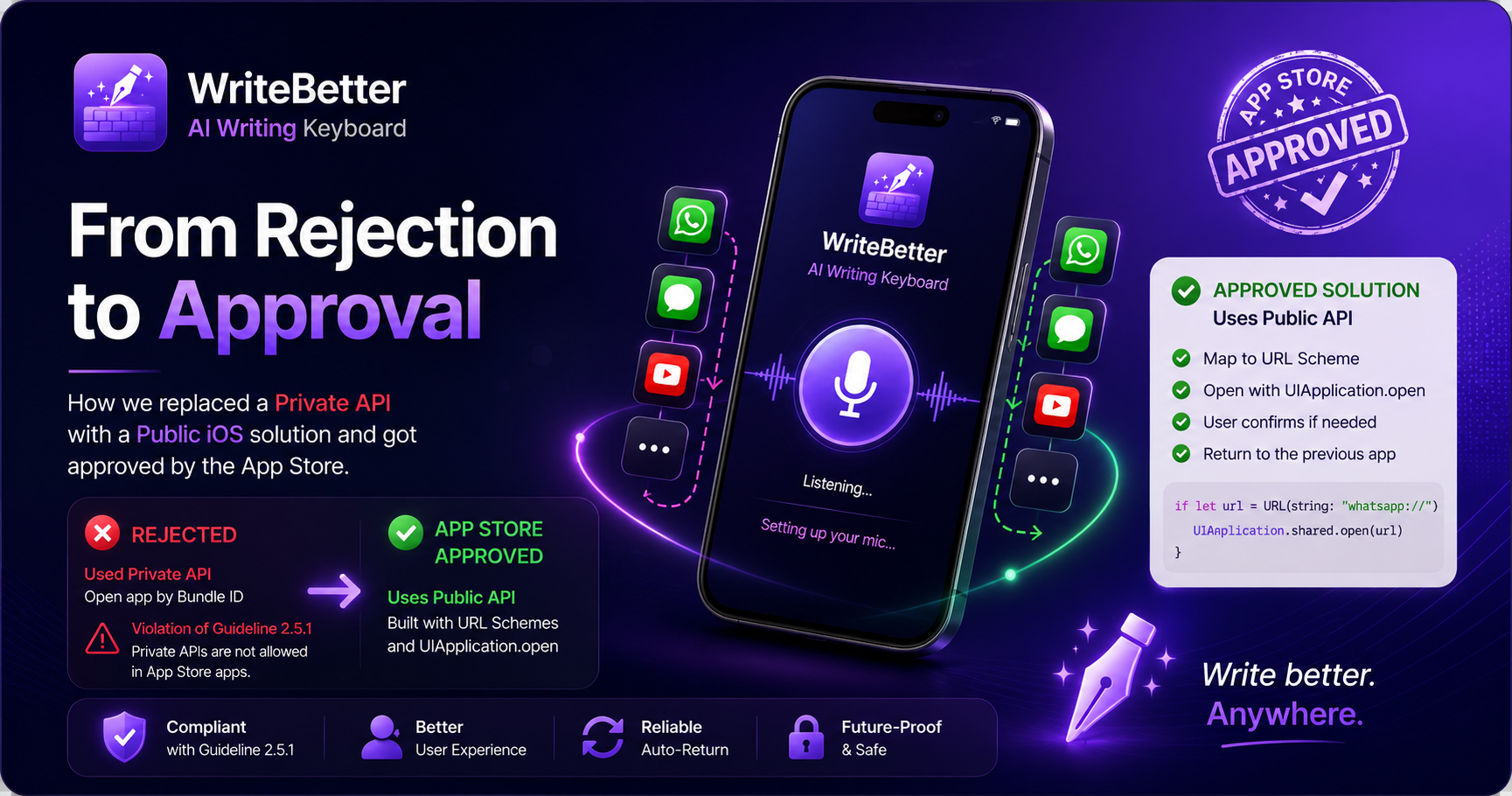
While preparing a new release of WriteBetter, our team encountered an App Store rejection because one feature relied on a private iOS API. The feature worked perfectly during development, but Apple rejected the build because private APIs are not allowed in App Store applications.
Instead of trying to bypass the review process, we redesigned the entire workflow using only public iOS APIs. This article explains the problem, our engineering approach, the solution, and the lessons we learned.
Understanding the Feature
WriteBetter allows users to dictate text while using other applications like WhatsApp, Messages, Notes, Gmail, or YouTube.
Since iOS keyboards have limitations around microphone activation, users are briefly redirected to the WriteBetter app to initialize voice input.
Once voice setup is complete, the ideal experience is returning users to the application they were previously using so they can continue typing without interruption.
Our goal was simple:
Start voice typing quickly.
Return users to the previous application automatically.
Keep the experience seamless.
Why Apple Rejected the App
The original implementation relied on an undocumented private iOS API that reopened the previous application using its bundle identifier.
Technically, it provided an excellent user experience because it could often restore the exact conversation, search page, or screen where users left off.
However, Apple's App Store Review Guidelines clearly prohibit the use of private APIs.
The app was rejected under:
Guideline 2.5.1 – Software Requirements
Apple only allows publicly documented APIs for App Store applications. Any reference to private or undocumented system APIs can result in immediate rejection during automated or manual review.
Public APIs vs Private APIs
Understanding the difference is essential for every iOS developer.
Public APIs | Private APIs |
|---|---|
Officially documented by Apple | Internal APIs used only by Apple's system |
Safe for App Store submission | Not allowed in App Store apps |
Stable across iOS updates | Can change without notice |
Supported by Apple | Can trigger automatic rejection |
Although private APIs may offer additional capabilities, they are not intended for third-party developers.
Our Original Approach
Initially, our auto-return feature worked like this:
Detect the previous application.
Retrieve its Bundle ID.
Launch that application directly using a private API.
Restore the user almost exactly where they left off.
From a usability perspective, this approach was excellent.
From an App Store compliance perspective, it wasn't acceptable.
Building an App Store-Compliant Solution
After the rejection, we completely redesigned the feature using Apple's supported APIs.
The new implementation follows this workflow:
Step 1
Detect which application launched WriteBetter.
Step 2
Map that application to its supported public URL Scheme.
Examples include:
WhatsApp →
whatsapp://Telegram →
tg://Gmail → Gmail URL Scheme
Step 3
Launch the application using the public API:
UIApplication.open()Step 4
If iOS displays a confirmation dialog asking permission to open another application, wait until the user confirms.
Step 5
Only mark the operation as successful after WriteBetter has actually moved into the background.
Step 6
If no supported URL scheme exists, gracefully fall back by asking the user to manually return to the previous application.
Engineering Challenges We Solved
Replacing one API call turned out to involve several platform-specific edge cases.
YouTube
Some deep links restarted YouTube instead of returning users to the previous page.
Using simpler URL schemes produced much more consistent results.
Before vs After
Previous Implementation | New Implementation |
|---|---|
Used Private API | Uses Public API |
Opened apps via Bundle ID | Opens apps using URL Schemes |
High App Store rejection risk | Fully App Store compliant |
Exact app restoration | Best-effort app restoration |
Difficult to maintain | Future-proof and stable |
The Trade-Off
Public APIs cannot perfectly reproduce every capability offered by private APIs.
While the previous implementation could often restore the exact screen inside another application, the new approach focuses on reliability, compliance, and long-term maintainability.
In cases where iOS limitations prevent automatic restoration, WriteBetter provides a clear fallback experience instead of relying on unsupported system behavior.
Key Takeaways
This experience reinforced several important engineering principles:
Never rely on private APIs for production App Store applications.
Always design features around officially documented Apple frameworks.
Build graceful fallback flows when platform limitations exist.
Long-term maintainability is more valuable than short-term convenience.
App Store compliance should be considered during feature design—not after rejection.
Conclusion
Every mobile platform has limitations, and successful products are built by working within those constraints rather than trying to bypass them.
By replacing our private API implementation with a public, App Store-compliant solution, we preserved a smooth user experience while ensuring the feature remains stable across future iOS releases.
The implementation may be slightly different from the original approach, but it's now secure, maintainable, and fully aligned with Apple's ecosystem.
For developers, the biggest lesson is simple:
When App Review flags a private API, don't hide it—redesign the feature using public APIs and build thoughtful fallbacks for the cases that public APIs cannot cover.
Comments
No comments yet. Be the first to share a thought.