7 Must-Have Tools for Android App Development

Reading Time: 8 minutes

INTRODUCTION

Android app development is the process of developing software programs that work with the Android operating system. Due to its open-source nature and widespread adoption, Android is a perfect platform for developers to produce cutting-edge and practical mobile apps.

Importance of using the right tools for Android app development:

Using the appropriate tools is essential for creating Android apps for a number of reasons. The developer’s productivity and efficiency can be greatly increased, to start. Many tasks, including developing, testing, and deploying the app, can be automated with the right tools, which can save a ton of time and effort. This entails that the developer won’t have to worry about the technological specifics and can concentrate on designing the app’s key functionality.

Second, employing the appropriate tools may raise the app’s quality. Numerous tools offer functions that aid in finding and fixing bugs, improving the performance of the app, and making sure it complies with the necessary requirements. These technologies can aid developers in producing more dependable, stable, and user-friendly programs.

Thirdly, staying current with the newest trends and technology in Android app development may be facilitated by utilizing the appropriate tools. Numerous tools offer frequent updates and new functions that can assist developers in producing apps that are compatible with the most recent Android devices and versions.


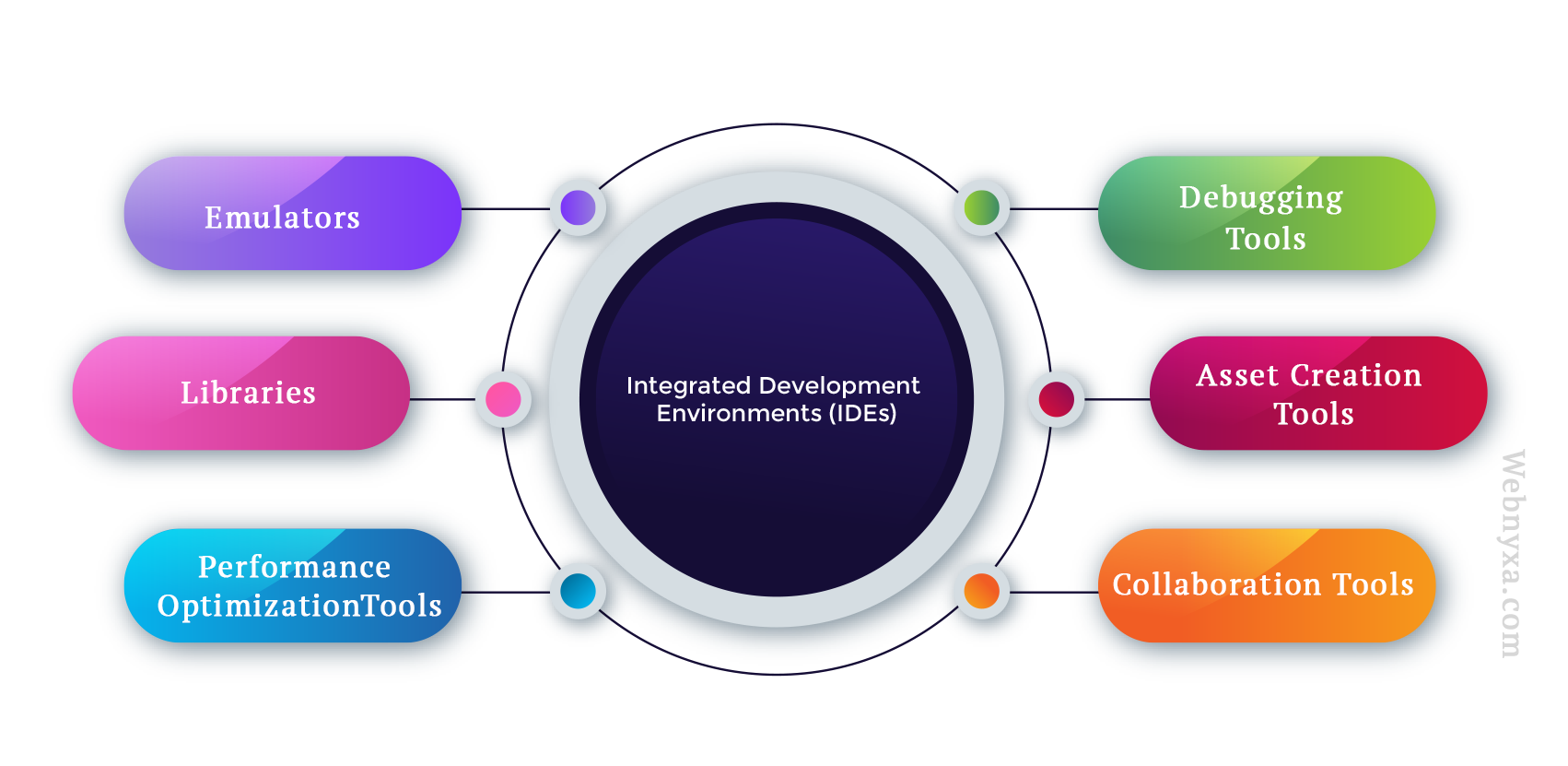
INTEGRATED DEVELOPMENT ENVIRONMENTS (IDEs)


The building of Android apps requires the use of Integrated Development Environments (IDEs). They give developers a full suite of tools to easily build, test, and deploy Android apps. Here is a summary of some of the best-known IDEs for Android development, their capabilities and advantages, as well as suggestions based on first-hand knowledge.

Android Studio: Google’s official IDE for creating Android applications is called Android Studio. It provides a full suite of tools, such as a code editor, layout editor, emulator, debugger, and more, for developing Android apps. Code completion, syntax highlighting, debugging, and a visual layout editor are some of its features. Kotlin, Java, and C++ are just a few of the programming languages that are compatible with Android Studio. Android Studio is open-source and free.

Eclipse: Eclipse is another popular IDE for Android app development. It offers a range of features for app development, including a code editor, debugger, and plugin system for customization. Eclipse has a vast user community, which means that there are numerous plugins and extensions available to improve its functionality. Eclipse is also free and open-source.

Visual Studio Code: Android developers are increasingly using the lightweight IDE Visual Studio Code (VS Code). Code completion, debugging, and Git integration are among the functions it provides. Developers may install extensions to increase the capabilities of VS Code, which is very flexible. Java, Kotlin, and C++ are just a few of the programming languages it supports. VS Code is free and open-source.

IntelliJ IDEA: IntelliJ IDEA is a powerful IDE that is widely used by developers for Android app development. It offers a range of features, including code completion, debugging, and a visual layout editor. IntelliJ IDEA is also highly customizable, and developers can install plugins and extensions to add more functionality. It supports various programming languages, including Java, Kotlin, and C++. IntelliJ IDEA offers a free and paid version.


Recommendations and personal experiences:

The most well-liked and suggested IDE for developing Android apps is Android Studio. It is the preferred IDE for many developers because to its capabilities, interoperability, and interaction with the Android environment. However, Eclipse and Visual Studio Code are also fantastic choices, particularly for programmers who favor portable and adaptable IDEs.


EMULATORS

Developers may test their Android apps on simulated devices using emulators, which are software tools. They let developers test an app’s functionality and user experience without the need for actual hardware because they mimic an Android device’s behavior. Emulators are crucial tools in the creation of Android apps because they let programmers test their applications in a range of settings, including multiple Android versions, devices with varied screen resolutions, and device sizes.

Android Emulator: Created by Google, Android Emulator is the recognized emulator for creating Android applications. It has a number of capabilities, including the capacity to mimic different device setups, Android iterations, and hardware characteristics. Additionally, it supports hardware acceleration, multiple sensors, and multi-touch input. Android Emulator is open-source and cost-free.

Genymotion: Genymotion is a well-liked emulator that provides a variety of options for creating Android apps. It provides a selection of virtual devices with various Android versions and setups. A variety of sensors and hardware acceleration are also supported. A premium version of Genymotion is available for commercial usage, however it is free for personal use.

BlueStacks: BlueStacks is an Android emulator primarily designed for gaming. However, it can also be used for Android app development. It offers a range of features, including the ability to run multiple apps simultaneously, support for gamepads, and the ability to record gameplay. BlueStacks is free and offers a paid version for commercial use.

Due to its exceptional performance, broad range of device configurations, and smooth integration, the built-in Android Studio emulator is the ideal option for the majority of developers. Genymotion is an excellent substitute, though, if you’re searching for a quicker emulator or have constrained system resources. For individuals who need Windows and macOS system compatibility or who want to test their apps in a gaming environment, BlueStacks may be a viable choice.

The Android Studio emulator has shown to be dependable and effective for the majority of programming tasks. However, you should utilize Genymotion when needed a quicker and less resource-intensive emulator. To discover the emulator that best fits your needs and workflow, it is always a good idea to investigate and test out a few different options.


DEBUGGING TOOLS

The process of creating Android apps includes debugging, which enables programmers to find and correct bugs in their code. In this article, we’ll talk about the value of debugging tools for Android development, give a rundown of the most common debugging tools, emphasize their features and advantages, and share some advice and firsthand knowledge.


Importance of Debugging Tools in Android Development:

Debugging tools play a significant part in the process of creating Android apps by assisting developers with the following tasks:

  • Find and correct any bugs and flaws in the code..
  • Know how the app behaves, performs, and uses resources.
  • By fixing problems and performance bottlenecks, you can guarantee the best user experience.

An Overview of Common Debugging Tools

Several well-liked Android development debugging tools are as follows:

Android Studio Debugger: The official IDE for Android development, Android Studio, has a potent built-in debugger that aids programmers in finding and resolving bugs in their code. It offers a variety of debugging capabilities, including variable examination, step-through execution, and breakpoints.

Logcat: Developers may read log messages from the system and app using the command-line tool called Logcat, which is part of the Android SDK. It assists in finding problems and comprehending the behavior of the software while running.

Stetho: Facebook created the open-source debugging tool Stetho. With access to network requests, database analysis, and more, it enables developers to examine their Android apps using the Chrome Developer Tools interface.


Features and Benefits of Each Debugging Tool:

Android Studio Debugger:

  • Seamless integration with Android Studio.
  • Allows developers to set breakpoints, step through code, and inspect variables.
  • Offers advanced features like conditional breakpoints and expression evaluation.
  • Helps in quickly identifying and fixing issues in the code.

Logcat:

  • Displays real-time log messages from the app and system.
  • Filters messages based on priority levels, tags, and processes.
  • Allows developers to export logs for further analysis.
  • Helps in identifying runtime issues and understanding app behavior.

Stetho:

  • Provides a familiar Chrome Developer Tools interface for Android app inspection.
  • Allows developers to view network requests, inspect databases, and manage shared preferences.
  • Offers JavaScript console support for executing JavaScript code in the app’s context.
  • Helps in identifying performance bottlenecks and understanding app behavior.
  • The default Android Studio Debugger, which provides robust debugging tools and easy integration, is a crucial tool for the majority of Android developers. Additionally useful for deciphering app behavior and locating runtime problems is Logcat. On the other side, developers who prefer a web-based debugging interface and need sophisticated functionality like network inspection and database administration will find Stetho to be extremely helpful.

LIBRARIES

Libraries are pre-written collections of code that are created to carry out particular tasks, and Android developers may utilize them to streamline their development process. These libraries often provide pre-written code that is simple to integrate into an application, saving time and effort for developers.

For Android programming, there are several libraries available, each with unique features and advantages. Several well-liked libraries for Android development are as follows:

Retrofit: A networking library that makes it easier to send and receive HTTP requests and answers.

Glide: Glide is a powerful image loading and caching library that can handle intricate image modifications and load pictures from a number of sources.

Room: A library that offers an abstraction layer on top of SQLite to make managing local data storage simpler

Dagger: A dependency injection library that aids in managing the connections between various application components.

RxJava: A library that offers reactive programming features, enabling programmers to create event-driven, asynchronous programs.

It’s crucial to take into account aspects like usability, interoperability with other libraries and frameworks, documentation, and community support when selecting a library for Android development. To guarantee that your libraries work with the most recent Android versions and other dependencies, pick ones that are regularly updated and maintained.


ASSET CREATION TOOLS

Asset creation tools are pieces of software that aid in the development and design of assets for use in Android applications, including graphics, icons, animations, and sound files. Because they enable developers to produce visually appealing and captivating applications that can improve user experience, these tools are crucial for Android development.

For Android development, a number of well-known asset generation tools are available, including:

Adobe Creative Suite: Photoshop, Illustrator, and After Effects are just a few of the many creative software programs in the Adobe Creative Suite, which may be used to develop a variety of assets for Android applications.

Sketch: A vector graphics editor made primarily for producing digital designs, such as user interfaces and app icons.

Inkscape: It is a free and open-source vector graphics editor which is useful for producing icons, logos, and other visual components for Android apps

Blender: 3D models, animations, and visual effects may all be produced for Android applications using the 3D modeling and animation program.

It’s crucial to take into account aspects like usability, interoperability with other software tools, and support for the file formats needed by the Android platform when selecting an asset creation tool for Android development. Choosing tools that offer a variety of features and capabilities that can be used to create high-quality assets is also crucial.


PERFORMANCE OPTIMIZATION TOOLS

The user experience of an application may be significantly impacted by performance optimization, making it a crucial component of Android development. Application performance issues may be found and fixed with the use of performance optimization tools, making the apps quicker and more responsive.

A number of well-known speed optimization tools are accessible for Android development, including:

  • The Android Profiler tool, which is incorporated into Android Studio, enables programmers to track and examine the CPU, memory, and network utilization of their programs in real-time.
  • To assist discover performance bottlenecks, developers can use the tool Traceview to view the execution times of particular functions inside an application.
  • A tool called Systrace, that helps developers comprehend how their application interacts with the Android operating system by providing extensive information on system-level events.
  • A cloud-based service called Firebase Performance Monitoring offers comprehensive statistics on how well an application is doing, including details on network requests, database queries, and user interactions.
  • It’s crucial to take into account aspects like usability, compatibility with other software tools, and the precise performance metrics that are significant to the application when selecting a performance optimization tool for Android development. Additionally, it is crucial to select software that offers insights that can be used to solve problems with performance.


COLLABORATION TOOLS

Because they enable developers to work together on projects, share code and resources, and communicate more effectively, collaboration tools are crucial for Android development. Tools for collaboration may speed up development processes, cut down on mistakes, and raise overall product quality.

For Android development, a number of well-liked collaborative tools are available, including:

GitHub: Developers can save and share code, manage projects, and communicate with others using this web-based platform.

Bitbucket: A web-based platform with features comparable to those of GitHub as well as Mercurial version control system compatibility.

Trello: Trello is a project management application that enables teams to schedule tasks, assign them to team members, and monitor their progress.

Slack: A platform for team collaboration that enables instant messaging, audio conferences, and video conferencing in real-time.

It’s crucial to take into account aspects like usability, interoperability with other software tools, and support for the unique requirements of the development team when selecting a collaboration tool for Android development. Additionally, it’s critical to pick tools that offer a variety of features that can be applied to facilitate collaboration and enhance communication.

CONCLUSION

In conclusion, collaborative tools, asset creation tools, libraries, and tools for performance optimization are crucial for developing Android apps. By streamlining the development process, enhancing performance, and facilitating efficient team collaboration, these technologies significantly contribute to the success of an Android application.

Success in Android development depends on choosing the appropriate tools because they have a big impact on an application’s effectiveness, quality, and overall user experience. Developers may work more quickly, make fewer mistakes, and produce high-caliber programs that satisfy their consumers’ expectations by selecting the appropriate tools.

Leave a Reply

PROS AND CONS OF PYTHON: A COMPREHENSIVE OVERVIEW

Reading Time: 4 minutes

INTRODUCTION

Python is a high-level programming language that is becoming popular day by day in the past years. Launched in 1991, it has gradually become one of the most used languages in the world due to its unique features like ease of use, readability and the ability to be molded in any environment.

Python is used in many fields of research most popularly in data science and machine learning along with scientific data computing. Many companies including Google, NASA, etc. have adopted it as their primary programming language.

In this blog, we will learn about the pros and cons of using the Python language, and decide who can be the most suitable users of this language.


PROS OF PYTHON

Comprehensive: Python is an ideal language for beginners as it has a simple and easy-to-understand syntax, making it an ideal language for beginners who want to learn programming. It uses indentations and white spaces to represent a block of code making it clear and easy to read. 

Active Community and Vast Documentation: The Python language comprises a large community of developers who provide resources like tutorials and documentation which makes it easy for other developers to get guidance whenever they face challenges or need guidance.

Adaptability and Flexibility: Python is a versatile language that adapts easily to different environments, showcasing flexibility for smooth development, such as for data analysis and machine learning, scientific computing, etc. For example, Django and NumPy.

Libraries and Modules: Developers have a huge range of libraries and modules available that make it easier for them to create complex applications with the help of the Python language. For instance, HTTP requests can be made through the requests library, and so on.

Easy Integration: Python can work simultaneously with other languages making it interoperable and easy to integrate with other systems such as C, C++, etc.

Compatibility: The applications developed with Python can run on different platforms such as Windows, Linux, MacOS, etc. which increases code reusability for developers making it easier for them to make applications for different platforms.

Scalability: Python can easily handle large projects and complex applications, making it the most in-demand language. Moreover, it can be extended through integration with third-party systems.

Strong Data Analyzation Capacity: Python contains huge libraries for data analysis and detailed visualization such as NumPy, Matplotlib, etc.


CONS OF PYTHON

Slower Compared to Other Languages: Python is comparatively slower than other languages as it is an interpreted language rather than compiled, unlike languages like C and C++ which slows down its performance for tasks that are intensive like machine learning.

However, it can be optimized through the libraries and modules available or by implementing algorithms in other lower-level languages like C.

Global interpreter lock (GIL) limitation: The Global Interpreter Lock (GIL) is a limitation in Python that prevents multiple threads from running Python bytecode at the same time.

This can limit performance when multiple threads are competing for CPU time. Although the GIL can be bypassed by using multiple processes instead of threads, this can add overhead and complexity to the code.

The GIL is a replacement that was designed to make it easier to write thread-safe Python code, but it can limit performance at some points.

Poor memory management: Python’s memory management can be a limitation for intensive tasks that require memory, such as processing large datasets or building complex applications.

Python uses automatic memory management, which means that the interpreter automatically assigns and absolves memory as needed.

However, over time, this may lead to memory leaks or displacement, which can impair stability and impede performance.

Developers need to be careful to avoid memory leaks and manage memory usage in large-scale Python applications.

Limited performance for CPU-bound tasks: Python’s performance can be limited for CPU-bound tasks, such as scientific computing or machine learning.

This is because Python’s interpreter has some upheld that can slow down performance compared to compiled languages.

However, several ways to optimize Python code for CPU-bound tasks exist, such as using specific libraries like NumPy or enforcing algorithms in C or other low-level languages.

No built-in support for parallel processing: Python lacks built-in parallel processing capacity, which can obstruct the performance of applications that require handling huge volumes of data concurrently.

Although there are third-party libraries that can provide parallel processing, they can add challenges to the code.

One needs to be careful in designing their code for efficient parallel processing and choose the appropriate libraries and tools for their use case.

The steep learning curve for some advanced topics: The learning curve for some complex concepts in Python, such as concurrency or parallelism, may be rather high.

A thorough grasp of Python’s internal and system-level programming may be necessary for these subjects.

Python’s high-level abstractions make creating straightforward code easy, but they also make it challenging to comprehend how the code operates.

Developers must be ready to invest time and effort in learning these difficult concepts to take full advantage of Python’s capabilities.

Limited capabilities for low-level system programming: Python’s ability for low-level system development may be constrained since it is a high-level language that abstracts many low-level aspects.

As a result, writing code that interacts directly with low-level system elements or hardware may be challenging.

Although Python offers a large number of libraries and system programming tools, it might not be a suitable option for applications that need low-level access to system components. Other languages, such as C or Assembly, could be a better fit in such circumstances.


CONCLUSION

In this blog, we learned about the benefits that Python offers such as easy readability, comprehensiveness, flexibility, versatility, and so on, which makes it an excellent programming language for building complex cross-platform applications and data analysis and visualization.

However, with its limitations developers must be aware of extending its capabilities to make the most out of it.

Python is a great choice for beginners in programming, data analysts, web developers, etc. Also, developers who prioritize fast prototyping, readability, and maintenance of their code should consider Python.

Overall, Python is easy to learn and use, and developers can benefit from it when working on a wide range of projects.

Leave a Reply

ADVANTAGES AND DISADVANTAGES OF DBMS: IS IT RIGHT FOR YOUR BUSINESS?

Reading Time: 3 minutes

WHAT IS E-COMMERCE?

The basic meaning of e-commerce is the purchasing and selling of goods or services via networks like the Internet. The fact that all trades, contacts, and transactions take place online sets it apart from normal trading.

With e-commerce, clients may make purchases online or use services from the convenience of their homes, eliminating the need for face-to-face interaction or shop visits. They only need to choose the items they want and pay using debit or credit cards, net banking, or any other online payment, and the goods or services will be readily available for them to use immediately.

As the e-commerce industry grows, more and more features are being incorporated into the websites that serve as the exchange platform for online transactions, increasing client confidence and reducing the risk of fraud or scams.


ADVANTAGES OF DBMS

There are several advantages of using a DBMS, or Database Management System, for managing and organizing data. Here are some of the key benefits:

Improved data consistency and accuracy: By imposing rules and restrictions on data entry and automatically updating data across various databases, a DBMS may assist guarantee that data is correct and consistent.

Effective data management and retrieval: A DBMS’s improved indexing and search algorithms enable speedy data retrieval and manipulation. Users will find it simpler to locate and get the data they want as a result.

Enhanced security and access control: To stop unwanted access and data breaches, a DBMS can offer strong security features including user authentication, data encryption, and access control.

Scalability for growing data needs: A DBMS may scale to accommodate enormous amounts of data because of its capacity to conduct complicated queries and improve data storage and retrieval. Scalability for expanding data demands.

Data collaboration and sharing: A DBMS can enable data collaboration and sharing across several users or applications, enabling them to view and manipulate the same data concurrently.

Reduced data redundancy and improved data integrity: Data redundancy may be eliminated by a DBMS by centralizing data storage and implementing data consistency standards, which also improve data integrity. Lowering the possibility of data mistakes and inconsistencies helps to improve data integrity.

Flexibility for multiple data types and structures: A database management system (DBMS) is capable of handling a variety of data types, including text, numbers, photos, and videos, as well as storing and managing them in diverse structures, including tables, graphs, and trees.

Simple backup and maintenance: A DBMS’s automated tools and processes may make data maintenance operations like backups, restorations, and recovery much easier.

Streamlined application development and integration: DBMSs can offer a standardized interface for application development and integration, making it simpler for developers to create and link apps to the database.


DISADVANTAGES OF DBMS

While there are many advantages to using a DBMS, there are also some disadvantages that should be considered. Here are some of the main drawbacks:

High initial cost and ongoing maintenance expenses: Implementing a DBMS can require significant time and money. This includes purchasing the software, training staff, and maintaining the system over time.

Risk of data loss or corruption due to system failure: Despite their robustness, DBMS systems can fail or experience data corruption, leading to potential data loss.

Complexity and potential for errors during implementation: Implementing a DBMS can be complex and time-consuming, and requires skilled personnel to manage and maintain the system. Errors in implementation can result in data loss, data inconsistencies, or other issues.

Dependence on the DBMS vendor and software updates: DBMS users depend on the vendor for updates, bug fixes, and support. Users may also be at risk of the vendor discontinuing support for the software.

Limited performance for some forms of data access: DBMS systems may have trouble with various types of data access, especially when handling unstructured data.

Potential for decreased performance due to excessive usage or bad design: Databases with high levels of utilization or those that are poorly built might result in slower performance and system problems.

Vulnerability to security threats and hacker efforts: If DBMS systems are not adequately protected or configured, they may be subject to security threats and hacking attacks.

Potential for data privacy breaches or abuse: If DBMS systems are not adequately protected or maintained, they may result in data privacy violations or misuse, endangering users’ reputations or putting them in legal hot water.


CONCLUSION

In conclusion, a DBMS (Database Management System) offers many advantages, including improved data consistency and accuracy, efficient data retrieval and management, enhanced security, scalability, and streamlined application development and integration. However, some disadvantages are also to consider, such as high initial cost and maintenance expenses, the potential for data loss or corruption, complexity, and vulnerability to security threats.

Businesses that manage large amounts of data and require efficient and secure data storage and retrieval should consider implementing a DBMS. However, they should also weigh the costs and potential drawbacks against the benefits.

It’s important to be aware of any potential drawbacks and take efforts to lower the risks even if a well-built and well-maintained DBMS may be a beneficial tool for data management.

Leave a Reply

Scope of e-commerce : exploring the opportunities

Reading Time: 4 minutes

WHAT IS E-COMMERCE?

The basic meaning of e-commerce is the purchasing and selling of goods or services via networks like the Internet. The fact that all trades, contacts, and transactions take place online sets it apart from normal trading.

With e-commerce, clients may make purchases online or use services from the convenience of their homes, eliminating the need for face-to-face interaction or shop visits. They only need to choose the items they want and pay using debit or credit cards, net banking, or any other online payment, and the goods or services will be readily available for them to use immediately.

As the e-commerce industry grows, more and more features are being incorporated into the websites that serve as the exchange platform for online transactions, increasing client confidence and reducing the risk of fraud or scams.


DIFFERENT WAYS TO CONDUCT E-COMMERCE

Different ways or types of e-commerce are emerging with time, some of which are-

B2B (BUSINESS-TO-BUSINESS) COMMERCE: As the name implies, this form of e-commerce entails one enterprise providing its goods and services to other enterprises. For instance, companies that deal with the production and sale of clothing online obtain their raw materials, such as fabric, from other online textile companies.

B2C (business-to-consumer): e-commerce, in which the customer deals directly with the provider of the item or service, is the most widely used type currently accessible. For instance, online stores like Amazon, eBay, JustDial, and others list and sell goods and services to customers directly.

C2B (CONSUMER-TO-BUSINESS): Consumers submit their specifications for a particular good or service, and businesses respond by matching the needs and providing a price. The customer accepts the finest offer offered to them.

IndiaMart, Upwork, and other websites of similar sort are examples.

C2C (CONSUMER-TO-CONSUMER) COMMERCE: Consumers who are currently using or possessing a product offer it for sale on an online marketplace and other consumers who require it accept the price and pay them directly through that platform without the need for a middleman. 

For instance, OLX, CarDekho, etc.


CHARACTERISTICS AND ADVANTAGES

Convenient and Time-Saving: E-Commerce allows customers to shop from the online store from the convenience of their homes providing the ease of shopping from anywhere and at any time, saving their time and cost of conveyance.

Wider Reach: Since e-commerce allows shopping for products and services from anywhere. It offers a wider reach as audiences around the world can access the online store.

Cost-Saving: Since an online store does not need any physical outlet, the cost of overheads and running is eliminated. This results in the company’s expenses being reduced, customers paying less, and profits increasing.

Personalized Buying Experience: Businesses recommend products fitting the needs of the customer based on the data collected from their activities on the internet, like search and browsing history. Tracking a consumer’s activity helps in a personalized shopping experience leading to more satisfaction.

Rapid Transactions: Transactions happen at a speedy rate on an online platform, as compared to visiting the store physically and making payments.


GROWTH OF E-COMMERCE IN THE RECENT YEARS: STATISTICS

  • In 2021, it is anticipated that global e-commerce revenues would total $4.9 trillion. Source: eMarketer)
  • E-commerce made up 19% of all retail sales globally in 2021, and by 2024, it is predicted that this percentage would rise to 21.8%. (Source: Statista)
  • E-commerce sales in the US increased by 44% in 2020 to $861 billion. (Source: Digital Commerce 360)
  • By 2021, it is anticipated that 72.9% of all e-commerce sales will be made on mobile devices, demonstrating the fast growth of mobile commerce. (Source: Statista)
  • With projected net sales of $386 billion in 2020, Amazon will be the largest e-commerce store in the world. (Source: Statista)
  • The top three e-commerce product categories in 2020 were electronics, apparel, and health and beauty items. (Source: Digital Commerce 360)
  • E-commerce sales are anticipated to exceed $3.5 trillion in the Asia-Pacific area in 2021, with China accounting for the greatest portion. (Source: Aarki)


THREATS AND CHALLENGES

Cyber Threats: E-Commerce websites are prone to cyber attacks resulting in data breaches of many customers including their names, phone numbers, credit card info, etc. which makes them less safe for online transactions.

Shipping Time and Costs: Although online stores do not require one to run a brick-and-mortar outlet of products, however, the shipping of products in time requires a proper shipping system, which may present itself as a challenge, especially when the business is operating on a global level.

Establishing Trust: The e-commerce business runs on the trust of the customer which takes time to be established. Customers may be skeptical towards making purchasing products online and performing online transactions.

Returns and Refund Policies: Effective policies for returns and refunds must be present for the customer so that will be assured of assistance in case of any fraudulent activity which may take a large portion of time.


FUTURE TRENDS AND POSSIBILITIES

Increased use of mobile for e-commerce: Day by day, the number of consumers preferring shopping through their mobile phones has been increasing. Hence, businesses need to optimize their websites to a mobile-friendly version, with a UI as intuitive and easy to navigate as their web store.

Emerging Marketplaces: Besides establishing a store on their own website, many businesses are moving towards selling of their products and services through marketplaces that are already established and trusted by customers. This results in more people being aware of your products and hence more sales without excess marketing costs.

More Personalization: AI and analytics are helping businesses gain more information about their customers, through their behaviors, patterns, and interests, resulting in more personalized recommendations driving more sales.

Importance of sustainability: Customers nowadays prefer businesses that along with providing quality products are working towards saving the environment through ethical practices such as reducing the use of plastic for packaging.

Use of Social Media: Social Media is widely used for marketing purposes with strategies for algorithms to reach a wider section of the audience.


CONCLUSION

In conclusion, e-commerce is likely to be shaped by new technologies, changing consumer behaviors, and increasing globalization. By staying up-to-date with emerging trends and adapting their strategies accordingly, you can position yourself for long-term success in the e-commerce industry.

Leave a Reply

How to Develop a Grocery App like Instacart, Bigbasket & Grofers

Reading Time: 3 minutes

This Global pandemic has affected all industries throughout the world. The government is urging people to stay at home and maintain social-distancing till the situation is overcome. People are stepping out of their homes only to buy daily essentials. Nowadays there is a demand for grocery delivery app in the market. People prefer to shop online rather than visiting the stores. Every industry is trying to move from offline to online marketplace. If you also want to shift your business online, then go through this article to know, how to create a grocery delivery app.

    • During this lockdown, we have seen the usage of grocery delivery apps has increased and there is a huge competition out there. If you don’t follow the trend and do not act smart then it’s quite difficult to run the business and stand out from the crowd in this lockdown. Do you wish a grocery app or mobile app that suits your business? Invest in On-demand Grocery App Development Company India and get your grocery delivery app at affordable prices

    • Firstly we will look at the types of grocery delivery apps
    • Single Stores: This type of apps is usually managed by the single stores itself and will have higher development costs.
    • Grocery Chains:
      One single app that can be used by multiple stores situated in different cities means one dedicated app for all their customers.
    • Aggregators: Acts like a mall where your nearby store will be listed and allow you to purchase the products from any of these stores listed on the app.

Must-have features of Grocery Mobile Apps

    • Here we have discussed 3 must-have features for On-demand grocery delivery apps. If you want to develop an on-demand grocery delivery app, you should hire the best Android app development company that delivers you a highly functional and feature-rich grocery mobile app.
    • Admin Panel
    • Store Management: Manage all stores from a single dashboard and can track orders also.
    • Product Management: Admin will manage the products by updating/adding/ deleting the menu, sub-menu, and products.
    • Order Management: Admin will be responsible for handling the order placed by the customers.
    • Transaction History: Admin can access and manage the payment transaction history.
    • Customer Management: Admin can manage the customer activities and will have access to block the customers if they do spam.
    • Report: Can analyze the report generated at a regular interval to monitor performances. Admin can use data and business intelligence to make better targets and performances.
    • Notifications: Admin can send emails, alert messages, push notifications to reach out to the customers and staff to provide the status of their grocery services.

Customer Panel

  • Registration: Customers or app users need to log in with some details like name, contact number, address to purchase the products.
  • Schedule Delivery: Customers can schedule the delivery time and date as per their convenience.
  • Real-Time Order Tracking: User can track their order or nearby stores with Geo-location technology.
  • Quick & Easy Search: It allows users or customers to search the products easily by the filter options.
  • Multiple Payment: Customers can make payments via a wide variety of payment options including Paytm, Google Pay, Net banking, Paypal, etc.
  • Order History: Customers can check their order history and can re-order the same order with just a few clicks.
  • Feedback & Rating: Users can give ratings and reviews on the various products they’ve purchased and can give ratings to store’s services also.
  • Offers & Discounts: Users are able to know and use the offers, deals, rewards & price drops for the next time purchase.
  • Delivery Boy Panel
  • Create Profile: Delivery boy can create a profile on the grocery app with some details and it will be verified by Admin.
  • Order Status: Delivery boy should be able to check the orders he has accepted, delivered, or rejected.
  • Track Location: With the help of GPS tracking features, delivery can track the destination.
  • Contact: Delivery boy can contact to the users or customers via chat or call feature.

May Why Demand For Grocery Delivery Apps During the Coronavirus Pandemic

Reading Time: 2 minutes

The whole world is severely affected by the Covid-19 or Coronavirus pandemic. People are urged to stay home and practice social distancing to stop the rapid spread of COVID-19. Many businesses have been hit by this coronavirus, but the grocery store business is on demand. With the help of a grocery apps, you can drive more customers by delivering services or essential items at their doorstep.With mobile apps, you can show your business existence to your potential customers. Grocery app allows visitors to explore the product category list in digital format and purchase products by paying online and get their products at their doorstep. If you’re running a grocery store and due to this corona outbreak, your business is facing challenges. Then launch your own grocery app today. Now you must be wondering how to create a grocery store app?? No need to worry. Hire Grocery app development company and get the complete guidance related to how grocery app will be developed, how much time it will take, what will be the development cost and so on.

People in many countries are going online for shopping groceries items to fulfill their daily food supply. In the U.S., daily downloads of the grocery delivery app have hit new records. Instacart, and Walmart Grocery Apps daily download has increased by 218%, and 160% respectively. As per reports, in the U.S., it is expected that grocery app sales will grow $25 billion by the end of 2020.

This pandemic has pushed many people to download the grocery apps and order their kitchen essentials online. In India, before the lockout announcement in the country, grocery app such as Grofers saw an 80% surge in the number of orders on its app in mid-March. After 2 weeks of the lockdown, Grofers app’s active users increased by 5times more than the last month active users.

How Do Grocery Apps Make Profits?

Convenience: Customers don’t need not to go to the supermarket or local grocery store to buy any products. They can get their kitchen essentials at their doorstep with a few taps. In this way, the online shopping for groceries becomes easier and convenient. It also allows users or visitors to explore the product based on their category-list and buy by making payment online.

Multiple Payments: Buying groceries become easy with multiple online payment options along with cash-on delivery and e-wallet. Customers can make the payment the way they want. Multiple payment features help drive more customers with a better user-experience.

Coupons, Discounts: You can make your customers happy by notifying them about the coupons, discounts, special deals, offers, sales, & price drops.

Live Tracking: Customers can know the exact status of their order with the live tracking feature in the app and can estimate the delivery date, day & time.

Schedule Delivery: Customers can choose or schedule delivery time & day as what time they want to receive the order.

People are increasingly relying on an online shopping app to save their time and to add convenience to their life. To ensure that your grocery store business survives in this coronavirus pandemic, you should take help of mobile app or websites. If you’re already thinking of making your grocery business shop an online presence, then you should invest in the e-commerce development company.