Inapp Purchase Subscription: From Chaos to Clarity

Reading Time: 2 minutes

We’ve built our share of complex apps—🛒 e-commerce platforms, 💬 real-time chat systems, 📊 advanced data dashboards. So when our EdTech client asked for subject-based access through inapp purchase subscription, we knew we could deliver.

The idea was straightforward: students could purchase access to specific subjects such as math, science, or history directly within the app.

We set up products in App Store Connect and Google Play Console. Everything was in place. But once we walked through the in-app purchase subscription flow in detail, one thing became clear: this wasn’t just about coding features, it was about making the smartest use of time, budget, and resources.


⚠️ The Hidden Complexity of In-App Purchase Subscription

Subscriptions often look simple at first, but reality is very different:

🌍 Two platforms, two worlds – Apple and Google each have their own APIs, lifecycle rules, and event flows. Keeping both in sync is possible, but time-intensive.

💸 Refunds and cancellations – Each store handles them differently, with separate webhooks and event timings. Writing and maintaining custom logic would require constant monitoring.

📊 Analytics demands – Our client wanted real-time clarity on active subscribers, renewals, churn, and revenue. Pulling reliable data from two different async sources meant building a mini data pipeline of its own.

We had the expertise to build all of this from scratch. But doing so would mean diverting weeks of developer time away from what mattered most: innovating on the learning experience.


💡 When Inapp Purchase Subscription Made Us Pause

we asked ourselves:

  • Do we invest weeks  in custom subscription infrastructure?

  • Or do we use a platform built specifically for this challenge, freeing our team to focus on features that matter to students?

Given the timelines, budget, and priorities, the smarter move was obvious.


🪄Finding the Right Answer for Inapp Purchase Subscription

That’s when we found RevenueCat—and honestly, it felt like a turning point in the story.

Here’s what it gave us:

🛠️ One system across iOS & Android – no more juggling two separate ecosystems.

🔄 Automatic lifecycle handling – renewals, upgrades, cancellations, and refunds all managed out of the box.

📊 Powerful analytics – instant insights into revenue, churn, and subscriber growth.

Faster delivery – instead of  weeks of backend plumbing, we shipped subscriptions quickly and focused on student-facing features.

🔒 Future-proofing – as Apple and Google evolve, RevenueCat evolves too.


🚀 The Big Win with Inapp Purchase Subscription

The transformation was dramatic.

When we launched, subscriptions just worked. No hidden errors, no mismatched states. The business team finally saw revenue and performance in real time. Developers could go back to creating innovative features for learners.

And the client? Absolutely thrilled. Less stress, more control, and a system built to grow.


🎯 What We Learned About Inapp Purchase Subscription

Some problems look simple but hide massive complexity. Subscription management is one of them.

The smartest move we made wasn’t trying to code our way through the mess. It was recognizing the complexity, stepping back, and choosing the right tool.

👉 With RevenueCat, we delivered a reliable, scalable subscription system that powers our client’s EdTech app, while keeping our team focused on creating world-class learning experiences.

Sometimes, the best code is the code you don’t have to write.

👉If your app uses in-app purchases, let’s connect and explore how we can build a smarter, scalable subscription system together

Also, don’t miss our previous article:  AWS Textract OCR for Smarter Salesforce Search

Leave a Reply

AWS Textract OCR for Smarter Salesforce Search

Reading Time: 4 minutes

Every attorney knows the frustration of searching for crucial documents ⚖️. Unfortunately, these documents often get buried in thousands of case files. Traditional Salesforce document search only scratches the surface—limiting results to filenames and basic metadata, while actual content remains invisible. That’s where AWS Textract OCR comes in. By enabling full-content search, it helps law firms unlock information hidden in scanned PDFs, handwritten notes, and court filings. As a result, firms save valuable time and recover lost billable hours daily ⏰.


Why Standard Salesforce Document Search Fails Without AWS Textract OCR

Unfortunately, standard Salesforce document search creates significant challenges for legal professionals 🚨. Specifically, the system only searches file names and basic metadata. As a result, scanned depositions remain unsearchable ❌. Similarly, court filings stay invisible. Additionally, handwritten notes cannot be found.

Furthermore, attorneys waste 2-3 hours daily hunting for documents. Meanwhile, critical evidence gets missed due to poor categorization. At the same time, teams constantly switch between multiple search tools. Consequently, this disrupts their workflow completely.

Moreover, the real cost includes several problems 💸. First, lost billable hours pile up. Second, case details get missed. Finally, legal teams feel frustrated. Ultimately, they cannot find what they need when they need it.


AWS Textract OCR Transforms How Legal Teams Search Documents in Salesforce

Fortunately, we have built the Google of legal document search 🎯. Indeed, it lives right inside your Salesforce org. Moreover, our advanced Salesforce document search app harnesses the full power of AWS cloud services ⚡. Specifically, we use AWS OpenSearch for lightning-fast indexing. Additionally, we use AWS Textract for industry-leading OCR. As a result, every single document becomes fully searchable by content.

Furthermore, our team specializes in AWS development 🏗️. In particular, we create robust cloud-native solutions. Subsequently, these integrate seamlessly with Salesforce. Most importantly, we chose AWS specifically for its enterprise-grade security. In addition, it offers scalability and advanced AI capabilities.


Advanced OCR Features for Salesforce Document Search

Wildcard Search Capabilities 🌟

For example, search “negligen*” and find multiple variations. Specifically, find “negligence,” “negligent,” “negligently” across all case files. Therefore, this feature catches different forms of legal terms perfectly.

Exact Phrase Matching 🎯

Similarly, find “proximate cause” to locate specific documents. As a result, only documents containing this exact legal standard appear. Consequently, this proves essential for finding specific legal concepts and citations.

Boolean Operations 🔗

Meanwhile, search complex queries with precision. For instance, use “medical malpractice AND expert witness NOT settlement” to narrow research. Thus, combine multiple criteria like a legal database.

Proximity Search 📍

Additionally, search “breach w/3 contract” for related terms. In particular, find “material breach of contract” or “breach of the contract.” Therefore, this catches related concepts. Furthermore, words do not need to be adjacent.

Smart Legal Autocomplete 🧠

For example, type “sum…” and get relevant suggestions. Specifically, see “summary judgment,” “summation,” “summons and complaint.” Most importantly, built specifically for legal terminology. Rather than generic business terms.


How AWS Textract OCR Revolutionizes Document Processing

Notably, our AWS expertise shines through our OCR implementation ✨. In fact, AWS Textract transforms your document accessibility with unmatched precision. For instance, handwritten deposition notes become searchable text 📄. Similarly, scanned court orders get instantly indexed. Additionally, exhibits become searchable immediately. Furthermore, old case files from paper archives become digitally searchable.

Moreover, we chose AWS Textract for specific reasons. Most importantly, it delivers 99%+ accuracy on legal documents. As a result, this far exceeds other OCR solutions 🤖.


Our AWS Cloud Architecture for Enterprise-Grade Performance

AWS S3 Document Storage 🗃️

Military-grade security and unlimited scalability for your legal documents. Our AWS development team configured S3 with advanced encryption and access controls.

AWS Textract OCR Processing 🤖

Industry-leading OCR with 99%+ accuracy on legal documents. We optimized Textract specifically for legal terminology and document formats.

AWS Lambda Serverless Processing ⚙️

Documents process instantly as they upload with zero infrastructure management. Our serverless architecture scales automatically with your firm’s needs.

AWS OpenSearch Intelligence 🔍

Our AWS OpenSearch implementation quickly finds and analyzes information across millions of documents through advanced indexing algorithms we developed.


AWS OpenSearch and OCR Integration for Salesforce Document Search

For Your Legal Team: 👥

First, upload documents to Salesforce exactly like before 📁. Next, our app processes them automatically in the background ⚙️. Then, search using natural language or legal terms 🔍. Subsequently, get instant results with direct links to Salesforce records ⚡. Finally, click and view documents without leaving Salesforce 👆.

AWS-Powered Backend Processing:

Initially, documents trigger our custom AWS processing pipeline. Next, AWS Textract extracts text from any file type with precision. Then, content gets indexed through AWS OpenSearch and linked to Salesforce records. Finally, our AWS-native architecture delivers results in familiar Salesforce UI.


Real-World OCR Results from Our Textract Salesforce Document Search

Dramatic Time Savings ⚡

As a result, law firms experience 90% reduction in document search time. Additionally, attorneys save 3+ hours per day. Furthermore, cases get prepared 50% faster with comprehensive document review.

Previously Impossible OCR Searches 🎯

For example, twenty years of scanned case files become instantly searchable through AWS Textract OCR. Similarly, handwritten deposition notes become findable with advanced OCR processing. Moreover, expert witness reports become searchable by content through our OCR technology, rather than just filename.

Measurable ROI 📈

Consequently, firms see increased billable hour recovery. In addition, faster client response times improve satisfaction scores. Finally, reduced risk of missing critical case documents.


Transform Your Salesforce Document Search with AWS Excellence

Struggling to find documents fast or looking to upgrade your search system? We’ve built a reliable, automated solution that transforms how teams find and use their data.

If you want to simplify your document search and save time, let’s connect. We’re ready to help you get it done. 🤝


Share your thoughts on how AWS Textract OCR is transforming Salesforce document search by checking out our latest LinkedIn post.

Also, don’t miss our previous article: Automated APK Builds for Shopify Stores


Leave a Reply

Automated APK Builds for Shopify Stores 📱

Reading Time: 2 minutes

At NoShopCode, our goal is simple 🎯. We allow any Shopify store owner to launch their own mobile app without writing code. However, as more clients started coming in, we needed something powerful on the backend. Therefore, we built an automated APK build system that generates Android apps on demand.


The Problem We Were Solving 🤔

Every store had unique branding, API keys, assets, and build configuration. Moreover, building each app manually was slow and unreliable. Additionally, using a shared server was costly 💸.

Furthermore, we didn’t want to maintain long-running build servers that sat idle most of the day. Therefore, we asked ourselves: “Can we create a system that only comes alive when needed, builds the APK, and disappears after it’s done?”

Fortunately, the answer was yes ✅. Subsequently, it changed everything.


How the Automated APK CI/CD Pipeline Works ⚙️

When a Shopify store owner clicks “Build App” on NoShopCode, here’s what happens with our automated APK system:

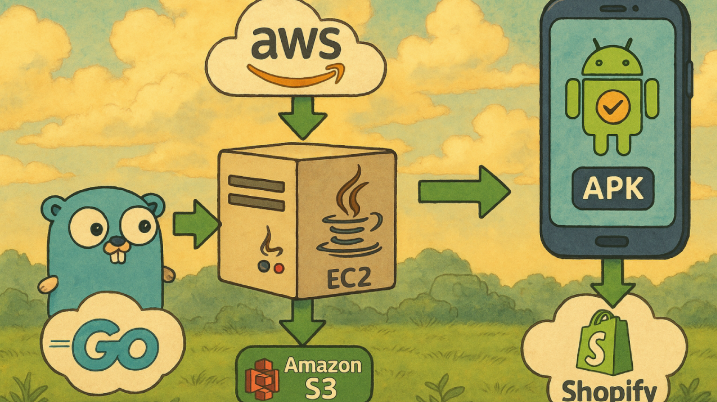
1. Go Service Handles the Request First, a lightweight Go backend receives the build request. Then, it queues it and kicks off the automation.

2. EC2 Instance Spins Up from AMI ☁️ Next, a fresh EC2 instance launches using a preconfigured AMI image. Moreover, this image already has all required Android SDKs, Java, Gradle, Node, and dependencies.

3. Git Clone and Java Build Begins Subsequently, the instance clones the appropriate repo and branch based on the customer’s store config. After that, the app is built using Java and the latest Android Gradle toolchain.

4. APK Uploads to Amazon S3 Once the build succeeds, the automated APK uploads to S3. Additionally, a download link is sent back to the client.

5. Auto-Termination Finally, as soon as the job finishes, the EC2 instance terminates itself. Therefore, there’s no idle time and no leftover resources.


Why Go and Java for Automated APK Builds?

Go (Golang) ⚙️ We used Go to build our orchestration layer. First, it’s fast. Second, it handles concurrent tasks excellently. Furthermore, it’s perfect for lightweight API servers and command execution.

Java (Inside the Build Instance) ☕ Meanwhile, Java is essential for modern Android builds. We used Java with Gradle because of its speed, compatibility with React Native, and overall stability.


Automated APK Pipeline Benefits We’re Seeing 📈

  • Our automated APK pipeline delivers several key advantages:
  • Fully Automated — First, the one-click build process requires zero manual work.
  • Cost Efficient 💰 — Moreover, we pay only for the time the EC2 instance is running.
  • Clean Builds — Additionally, there are no cache issues or stale configs.
  • Scalable — Furthermore, the system can handle 1 or 100+ builds per day without slowing down.
  • Isolated and Secure 🔒 — Finally, each build runs in its own environment.


Final Thoughts 💭

As a founder, I’ve learned that automation isn’t just nice-to-have. Instead, it’s a necessity if you want to scale without burning out.

This automated APK pipeline has saved us hours of dev time ⏰. Moreover, it has made our product more reliable, faster, and scalable. Now, every time a store owner clicks “Build App,” a clean Android app is ready in minutes. Most importantly, this happens with no manual involvement from our team.

If you’re working on something similar or want help setting up a build system like this, I’m happy to connect and share notes 🤝

Share your thoughts on how AI and automation are revolutionizing data analysis by checking out our LinkedIn post.

Also, check out our previous post: Automating Data Analysis and Reporting with AI

Leave a Reply

📊Automating Data Analysis and Reporting with AI

Reading Time: 3 minutes

❌ The Struggle: Overwhelmed by Data Analysis in Excel Files

 Imagine a data analysis company helping businesses track employee engagement. Every year, they get huge Excel files filled with survey data, including demographics, ratings ⭐, and comments 💬 from thousands of employees.

While the data is important, analyzing it is a challenge. The company uses Excel tools—formulas, pivot tables, and charts—to process the data. This takes a lot of time and effort, often taking weeks ⏳ to finish.

Moreover, they couldn’t get an overall view of industry performance, compare data from different years 📆, or analyze long-term trends 📈. Creating industry-wide scores or comparing years in Excel was nearly impossible.

They also needed to hire consultants to analyze open-ended comments, which added cost 💸, complexity, and delays.

Clearly, the system wasn’t working, and something needed to change.

🔄 The Turning Point: Replacing Manual Data Analysis with AI and Automation

Our client came to us for a solution. They needed a way to automate the process, reduce errors, and get real-time insights ⚡. To help them scale, we needed to transform their workflow completely.

So, we built a solution to automate data analysis, making the process faster. This shift turned months of manual work into minutes of automated results ⏱️.

💡 The Solution: Automating Survey Data Import and Analysis

We started by making data import easy. No more copying and pasting data from Excel. We created a simple feature where our client could upload Excel files directly into the system 📂. These files could include survey data, ratings, and employee comments. With just a few clicks, the system automatically processes the data, saving time and avoiding mistakes.

Once the data was in, the magic happened ✨.

📊 Real-Time Data Analysis: From Data to Insights in Seconds

Next, we needed to turn the data into useful insights. In the past, our client manually sifted through graphs and charts. With our system, they could see data in real-time—whether as bar charts, pie charts, or radar charts.

The system didn’t just show isolated data. Now, they could easily see:

  • Overall industry performance 🏆: What trends were emerging across companies in the same industry?

  • Company-specific performance: How well did each company perform in areas like Leadership, Communication, and Teamwork?

  • Year-over-year comparisons 📆: How did a company perform this year versus the last?

  • Industry-wide scores: What was the overall performance of companies in a specific industry?

What used to take weeks of manual work now took just minutes.

🤖 AI-Powered Data Analysis for Feedback Summarization

We didn’t stop there. One big challenge was analyzing open-ended comments. Our client had been outsourcing this task for years.

To solve this, we added an AI-powered feedback summarization tool. The system automatically analyzes employee comments and sorts them into positive ✅, neutral 😐, or negative ❌ categories. It also generates actionable recommendations for areas of improvement.

For example, instead of spending days reading comments in Excel, the system automatically summarizes feedback. A single click generates a PDF 📄 report with:

  • Sentiment breakdown for each focus area (e.g., Leadership, Communication)

  • Key insights from employee comments 💡

  • Actionable steps for improvement 🚀

What once took days of work was now done with a single click.

🔐 Secure Sharing and Easy Reporting

After analyzing the data, the next step was sharing the results. In the past, our client emailed large Excel files 📧, leading to confusion and security concerns. To solve this, we built a secure sharing feature that allowed them to generate shareable links 🔗 to reports. These links could be sent directly to clients, with access control to ensure only authorized users could view the data.

🌟 The Results: A Transformed Process

The impact was immediate. Here’s what changed:

  • 100% reduction in time spent on manual data processing and report generation

  • Complete elimination of human error ✅, ensuring consistency

  • AI-driven feedback analysis provided real-time insights ⚡

  • Year-over-year and industry-wide comparisons became automatic

  • Easy, secure sharing of reports via shareable links 🔗

📝 Key Takeaways from Our Data Analysis Solution

  • ⚡ Automation saves time and improves accuracy.

  • 🤖 AI-powered feedback analysis transforms how open-ended comments are processed.

  • 📊 Real-time analytics allows organizations to make faster, more informed decisions.

  • 🏭 Industry-wide comparisons provide actionable benchmarks.

  • 🔐 Secure sharing simplifies collaboration and protects sensitive data.

🚀 If your organization is still using Excel for survey data analysis, it’s time to upgrade. Let’s connect and discuss how we can help transform your survey analytics process with AI and automation.

Share your thoughts on how AI and automation are revolutionizing data analysis by checking out our LinkedIn post.

Also, check out our previous post on Why Choose Nest.js & Next.js for SaaS? to learn more about building scalable platforms.

Leave a Reply

Why Choose Nest.js & Next.js for SaaS?

Reading Time: 2 minutes

A client approached us with a problem: their current tech stack couldn’t handle their growth. The platform was slow, updates were hard, and adding new features was tough. They needed a faster, scalable solution. That’s when we turned to Nest.js and Next.js.

Nest.js: The Backbone of Our Platform

We chose Nest.js for its modular architecture, which let us break the backend into microservices, ensuring scalability as the platform grew.

With built-in features like security, authentication, and input validation, Nest.js allowed us to focus on building core features without worrying about the basics. Its microservice setup made updates smooth, perfect for a growing SaaS platform.

Next.js: Bringing the User Experience to Life

For the frontend, we chose Next.js for its speed and SEO-friendly features. Server-Side Rendering (SSR) improved load times and boosted SEO, making the platform more accessible.

Additionally, we used Static Site Generation (SSG) for high-traffic pages to ensure fast loading, even on mobile. Incremental Static Regeneration (ISR) allowed dynamic content updates without needing to rebuild the entire platform.

The Synergy: Nest.js + Next.js

Using Nest.js and Next.js together worked perfectly. While Nest.js handled the data and logic, Next.js ensured the user experience was smooth and fast. The integration created a seamless, scalable platform.

Scaling the Platform

As the platform grew, Nest.js allowed us to scale the backend with microservices, whereas Next.js kept the frontend fast and responsive. This helped the platform handle more traffic and content smoothly.

The Result

The result was a high-performance platform that met the client’s current needs and was ready for future growth. By using Nest.js and Next.js, we built a flexible, future-proof solution.

Conclusion

The right tech stack, was key to building a scalable, high-performance SaaS platform. This combination allowed us to deliver a robust solution that grows with our client’s business.

At Webnyxa, we focus on using the best technology to drive innovation. If you’re looking to build a scalable, high-performance SaaS platform, we’re here to help create a solution that evolves with your business.

Share your thoughts on how Nest.js and Next.js are changing SaaS platforms by checking out our LinkedIn post.

For the latest Angular trends in 2025, explore our article on Top 10 Angular Development Trends to Watch in 2025

Leave a Reply

Top 10 Angular Development Trends to Watch in 2025

Reading Time: 5 minutes

As technology evolves at an unprecedented pace, so does the development landscape, particularly for front-end frameworks. Angular, one of the most popular open-source web application frameworks, has consistently been at the forefront of shaping web development. With its robust features, flexibility, and strong community support, Angular continues to be a top choice for developers building dynamic, high-performance web applications. As we move into 2025, several trends are emerging in the Angular ecosystem that businesses, developers, and even outsourcing agencies must watch closely.

In this blog, we explore the top 10 Angular development trends to keep an eye on in 2025. These trends will influence everything from UI/UX design expertise to outsourcing development services, ensuring that developers continue to create more efficient, user-friendly, and scalable applications.


1. Enhanced UI/UX Design Expertise


UI/UX design remains a critical aspect of Angular development in 2025. With more businesses prioritizing user satisfaction, ensuring that applications are visually appealing and easy to use is a must. Angular, being a highly flexible and scalable framework, allows developers to create visually stunning applications that are also highly responsive across various devices.

As user expectations become more sophisticated, Angular developers will need to partner with experts who specialize in UI/UX design expertise to create intuitive and aesthetically pleasing interfaces. This is especially important as Angular applications often cater to complex user interactions, such as dashboards, e-commerce sites, and real-time data visualizations. Combining Angular’s power with top-notch design principles will lead to more engaging and accessible applications.


2. Outsourcing Development Services for Angular Projects


As the demand for Angular developers grows, more businesses are looking at outsourcing development services to accelerate their projects. Outsourcing allows companies to tap into a global talent pool, saving both time and resources. Hiring developers or entire development teams from regions with lower costs can also lead to more cost-effective solutions.

Outsourcing Angular development can benefit companies by providing them with specialized expertise without the need for large in-house teams. As businesses aim to reduce overheads, outsourcing agencies that specialize in Angular will become a more popular choice. These agencies provide services ranging from custom Angular development, migration from other frameworks to Angular, to application optimization, ensuring that companies can meet their business goals efficiently.


3. SEO for Single Page Applications (SPAs)


In recent years, SEO has been a growing challenge for Single Page Applications (SPAs). Since SPAs load dynamically, they often face issues with search engine crawlers not being able to index content properly, which negatively impacts SEO rankings. However, with Angular’s latest advancements in Server-Side Rendering (SSR) through Angular Universal, developers can now improve the SEO performance of SPAs.

In 2025, SEO for SPAs will be more critical than ever, and developers will need to focus on ensuring that their Angular applications are SEO-friendly. By leveraging tools like Angular Universal, developers can pre-render pages on the server, enabling search engines to crawl and index them effectively. This will improve the visibility of Angular applications, ultimately driving more organic traffic and improving the user experience.


4. Integration with Micro-Frontends


In 2025, the micro-frontend architecture is expected to gain significant traction in Angular development. Micro-frontends allow developers to break down a complex web application into smaller, independent parts that can be developed, deployed, and scaled separately. This approach makes it easier to work on different modules concurrently, allowing for faster development cycles.

Angular’s modularity and component-based architecture make it a perfect fit for micro-frontends. By integrating micro-frontends, developers can create highly scalable, maintainable applications where teams can work on individual parts of an application without stepping on each other’s toes. This approach will become even more relevant as applications grow in complexity and require more flexible development solutions.


5. The Growth of Angular in Top Frontend Frameworks


In 2025, Angular will continue to solidify its position as one of the top frontend frameworks 2025. While frameworks like React and Vue.js have gained popularity, Angular’s all-in-one solution for building scalable, enterprise-level applications ensures its place as a top contender. The framework’s robust tooling, modularity, and TypeScript integration make it an ideal choice for developing complex applications.

Angular’s deep integration with RxJS, Angular CLI, and other advanced features means that it is consistently updated with cutting-edge capabilities. With every new release, Angular continues to improve in areas like performance optimization, testing tools, and new features that cater to modern development practices. In 2025, Angular’s continued growth and its ability to handle large-scale applications will keep it firmly at the top of the frontend framework race.


6. Increased Focus on Performance Optimization


As web applications become more feature-rich, ensuring that they are performant becomes even more critical. Angular has always been known for its performance, but with the growing complexity of modern applications, performance optimization will continue to be a key focus in 2025. Developers will need to embrace techniques like lazy loading, AOT (Ahead-of-Time) compilation, and change detection strategies to improve load times and overall app responsiveness.

The need for performance optimization is particularly crucial in mobile-first development, where users expect fast, seamless experiences. Angular’s built-in performance features, such as its powerful dependency injection system and optimized bundling, will continue to play a vital role in improving application speed and reducing latency.


7. Serverless Architectures


In 2025, serverless architectures will gain more popularity in the Angular development community. Serverless computing, where developers can build and run applications without managing servers, allows companies to focus more on business logic rather than infrastructure. By integrating Angular with serverless platforms like AWS Lambda or Azure Functions, developers can create highly scalable applications without worrying about the backend.

Angular’s support for serverless architectures will provide developers with the flexibility to build applications that can scale up or down depending on demand. This trend will likely reduce development time and cost, enabling businesses to deploy Angular applications faster and more efficiently.


8. Adoption of Progressive Web Apps (PWAs)


Progressive Web Apps (PWAs) combine the best features of both web and mobile apps, offering users a fast, reliable, and engaging experience. In 2025, the adoption of PWAs will continue to grow, and Angular will be at the forefront of this trend. Angular provides a solid foundation for building PWAs, with built-in tools to manage offline support, push notifications, and improved performance.

By creating PWAs with Angular, businesses can reach a broader audience, improve their app’s performance, and deliver a better user experience. With the growing trend of mobile-first browsing, PWAs are becoming a must-have for businesses looking to stay competitive in the ever-evolving digital space.


9. Cross-Platform Development with Angular


In 2025, cross-platform development will continue to be a dominant trend in the Angular ecosystem. With Angular’s increasing support for mobile app development through tools like Ionic, NativeScript, and Angular’s support for hybrid apps, developers can build applications that run seamlessly across multiple platforms – web, mobile, and desktop.

By leveraging Angular’s cross-platform capabilities, businesses can save both time and resources by maintaining a single codebase across multiple platforms. This trend will allow businesses to create more consistent and cohesive user experiences while reducing development overhead.


10. AI and Machine Learning Integration


Artificial Intelligence (AI) and Machine Learning (ML) are making their way into web development, and Angular is no exception. In 2025, we will see increased integration of AI and ML technologies in Angular applications, allowing developers to build smarter, more personalized applications.

Angular’s extensibility allows developers to integrate third-party AI and ML libraries, enabling them to add features such as chatbots, recommendation engines, or predictive analytics to their applications. These technologies will enhance the user experience and allow businesses to leverage data-driven insights to make more informed decisions.


Conclusion


As Angular development continues to evolve, 2025 will be an exciting year full of new opportunities and challenges. From enhanced UI/UX design expertise to the growing importance of SEO for Single Page Applications, Angular developers will need to stay agile and embrace these emerging trends to remain competitive. Additionally, the rise of outsourcing development services and the integration of new technologies such as AI, machine learning, and serverless architectures will shape the future of Angular development.

By staying up-to-date with these trends and focusing on performance optimization, cross-platform development, and SEO strategies, businesses and developers can harness the full potential of Angular to create high-quality, scalable, and efficient applications.

 

Leave a Reply